The Design Process of The Sinhala Addendum Keyboard Layout
Recently, After years of frustration with the the default Wijesekara keyboard layout used for the Sinhala language, I took it upon myself to design a much more convenient keyboard layout for day-to-day usage. After about a month of designing, I’ve finally come up with what I’m calling the Sinhala Addendum Keyboard Layout
Background
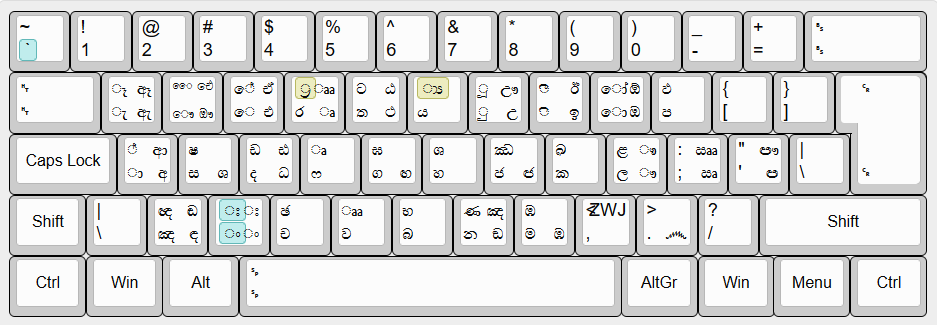
The official keyboard layout that is used with the sinhala writing system is the Wijesekara layout which was first created as a layout for type-writers. This layout, while not something that is badly designed has one flaw which holds it back from adoption by the average person, Which is that the letter placements are not at all obvious unless the keyboard has keycaps with the letters printed on them. As such, most people find it difficult to use this layout since they are only really accustomed to using the QWERTY layout. Personally, I am able to manually enter the unicode codepoint for a certain letter quicker than typing it with the wijesekara layout
Here’s a preview of the Wijesekara layout for reference,
Design Goals
My primary goal with the design of the layout was to make sure for it to be intuitive as possible to use for anyone who is used to the QWERTY layout. This meant mapping Sinhala characters to Latin characters which were phonetically close to each other, which turned out to be a far easier task than I had anticipated for *most* characters. Other than that, I also wanted it to be able to input any character of the Sinhala Akshara Maalawa (සිංහල අක්ෂර මාලාව) without any major hassle.
The Attack of The තටදඩ Nation
The first major decision I had to make while designing this layout was the placement of the characters ත,ට,ද,ඩ and their aspirated and pre-nasalised counterparts. For other consonants with aspirated versions I was able to assign the base state of the key to the non-aspirated character and the shift state to the aspirated characters, and if the character had a pre-nasalised version, I was able to assign it to AltGr state of the key.
To understand the problem with these characters, we’ll have to take a look at their approximate English transliterations.
- ත - tha | [t̪a]
- ථ - (aspirated version)
- ට - ta | [ʈa]
- ඨ - (aspirated version)
- ද - da (close to how “the” sounds) | [d̪a]
- ධ - (aspirated version)
- ඳ - (pre-nasalised version)
- ඩ - da | [ɖa]
- ඪ - (aspirated version)
- ඬ - (pre-nasalised version)
These pesky characters destroyed my hopes of having a consistent pattern of Key+Shift for the aspirated version of the character and Key+AltGr for the pre-nasalised version, as I had to fit all those within the D and T keys.
So for these characters I decided to go with a new scheme, fitting two base characters to the base and shift state of the key, and then their aspirated versions being accessible with AltGr
So for example, with the T key
t->ත(basethacharacter)AltGr+t->ථ(aspirated version)Shift+t->ට(basetacharacter)Shift+AltGr+t->ඨ(aspirated version)
(The more used letter betweeen the two is assigned to the base key)
This still left the two pre-nasalised characters dangling, and I had to put them in random keys which wasn’t at all intuitive to anybody. As such this left me wondering if there was another consistent and intuitive method which I could include in the layout for accessing aspirated and pre-nasalised characters
Say Hello to Our Messiah, Les Touches Mortes, aka Dead keys
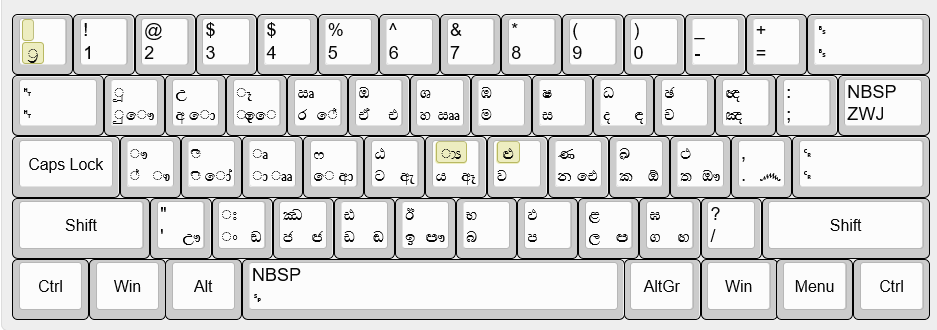
Dead keys presented itself as the solution to all of my above mentioned issues. Dead keys are keys which modify the output of the proceeding keypress. Different platforms have different implementations and limitations with them, but on windows with MSKLC I was able to assign a dead key to any key (Unlike with xkb on Linux). So I assigned the x key (ං on the layout) and shift+x (ඃ on the layout) as dead keys to access pre-nasalized characters and aspirated characters respectively
Les Touches Mortes : Édition Des Voyelles
The writing system of the Sinhala language is an abugida, which means that we mark vowel sounds on consonants with diacritics/vowel markers (I still don’t know the correct linguistic terminology). We also have dedicated vowel letters in Sinhala that are used if the word starts with a vowel sound.
For all vowels (Which are still in modern usage). At first I settled with having the vowel marker characters on the base and shift state of the key, and to have the equivalent vowel letters for them to be accessible with altGr.
So for example, with the O key,
o->ොAltGr+o->ඔShift+o->ෝShift+AltGr+o->ඕ
But like… do you really want to hit Shift + AltGr + O just to type a stupid word like ඕලන්දය?
Well dead keys are here to save the day again! if I was developing an input method instead of a keyboard layout I’d probably have had the vowel marker keys input the vowel letter depending on the context, but dead keys provide a decent enough alternative. The ` key acts as a dead key which makes the proceeding key’s vowel marker’s equivalent vowel letter be inputted.
So, let’s take a look at the above example again, but this time with dead keys,
o->ො`<then>o->ඔShift+o->ෝ`<then>Shift+o->ඕ
Dead keys, ily. Hit me up if you are reading
Apparently There Are Sinhalese Characters Which I Never Knew About
Well the title explains everything, there were bunch of characters which I have zero knowledge of, and there were so much consonant conjunct ligatures which I had never seen before, and weren’t really in modern usage anymore. I didn’t want to randomly sprinkle in a bunch of ancient ligatures so I assigned the Zero Width Joiner unicode character to Shift + AltGr + , so that anyone could manually type out any godforsaken ancient ligature to their heart’s content.
Update : I am testing out having X deadkey + X input a zero width joiner to make inputting ligatures much easier.
Soo, Here Be Dragons!
The layout in its current state is available on Github, but currently it is only available as MSKLC KLC file, so only usable within windows. I plan on porting the layout to m17n platform on linux soon.
In addition to that, Jan Kucera at KBDLayout.info graced us with this preview of the keyboard layout.